📊 Trading
Evolve multi-stage trading pipelines that maximize Sharpe ratio.
Prerequisites
-
VEOX Server: Start the local VEOX server (requires Docker):
See the Quick Start for detailed server setup, health checks, and Docker Compose instructions.docker run -d \ --name veox-enclave-server \ -p 8090:8090 \ 714044927654.dkr.ecr.us-east-2.amazonaws.com/doug/single_enclave/veox-enclave-server:latest -
Python SDK: Install the
veoxpackage via PyPI:
What It Does
The trading family is the most complex, evolving 19-stage pipelines:
Signal → Feature Engineering (×4) → Regime Detection → Risk → Position Sizing →
Execution → Portfolio → + 9 more stages
Each candidate is backtested across 367+ financial datasets using the proprietary VEOX trading evaluator. This runs against server-side data and does not require client-side datasets.
Quick Start
from veox import VeoxEvolver

evolver = VeoxEvolver("trading")
evolver.fit(max_generations=5, population_size=30, max_poll_time=900)
print(f"Best Sharpe: {evolver.best_fitness_:.4f}")
print(f"Pipeline:    {evolver.best_pipeline_}")
Full Example
from veox import VeoxEvolver

# 1. Connect
evolver = VeoxEvolver("trading", api_url="http://127.0.0.1:8090")
evolver.health_check()

# 2. Evolve (trading uses server-side financial datasets)
evolver.fit(
    max_generations=5,
    population_size=30,
    timeout_per_eval=120,    # Trading evals are longer
    max_poll_time=900,       # 15 min wall-clock
)

# 3. Inspect
print(f"Best Sharpe: {evolver.best_fitness_:.4f}")
print(f"Pipeline:    {evolver.best_pipeline_}")
print(f"Evaluations: {evolver.result_.total_evals}")
print(f"Throughput:  {evolver.result_.evals_per_minute:.1f} evals/min")

# 4. Save
evolver.save("trading_results.json")
from veox import VeoxEvolver

# 1. Connect
evolver = VeoxEvolver("trading", api_url="http://127.0.0.1:8090")
evolver.health_check()

# 2. Evolve (trading uses server-side financial datasets)
evolver.fit(
    max_generations=5,
    population_size=30,
    num_islands=4,              # 💎 PRO FEATURE: 4 parallel islands
    timeout_per_eval=120,    # Trading evals are longer
    max_poll_time=900,       # 15 min wall-clock
)

# 3. Inspect
print(f"Best Sharpe: {evolver.best_fitness_:.4f}")
print(f"Pipeline:    {evolver.best_pipeline_}")
print(f"Evaluations: {evolver.result_.total_evals}")
print(f"Throughput:  {evolver.result_.evals_per_minute:.1f} evals/min")

# 4. Save
evolver.save("trading_results.json")
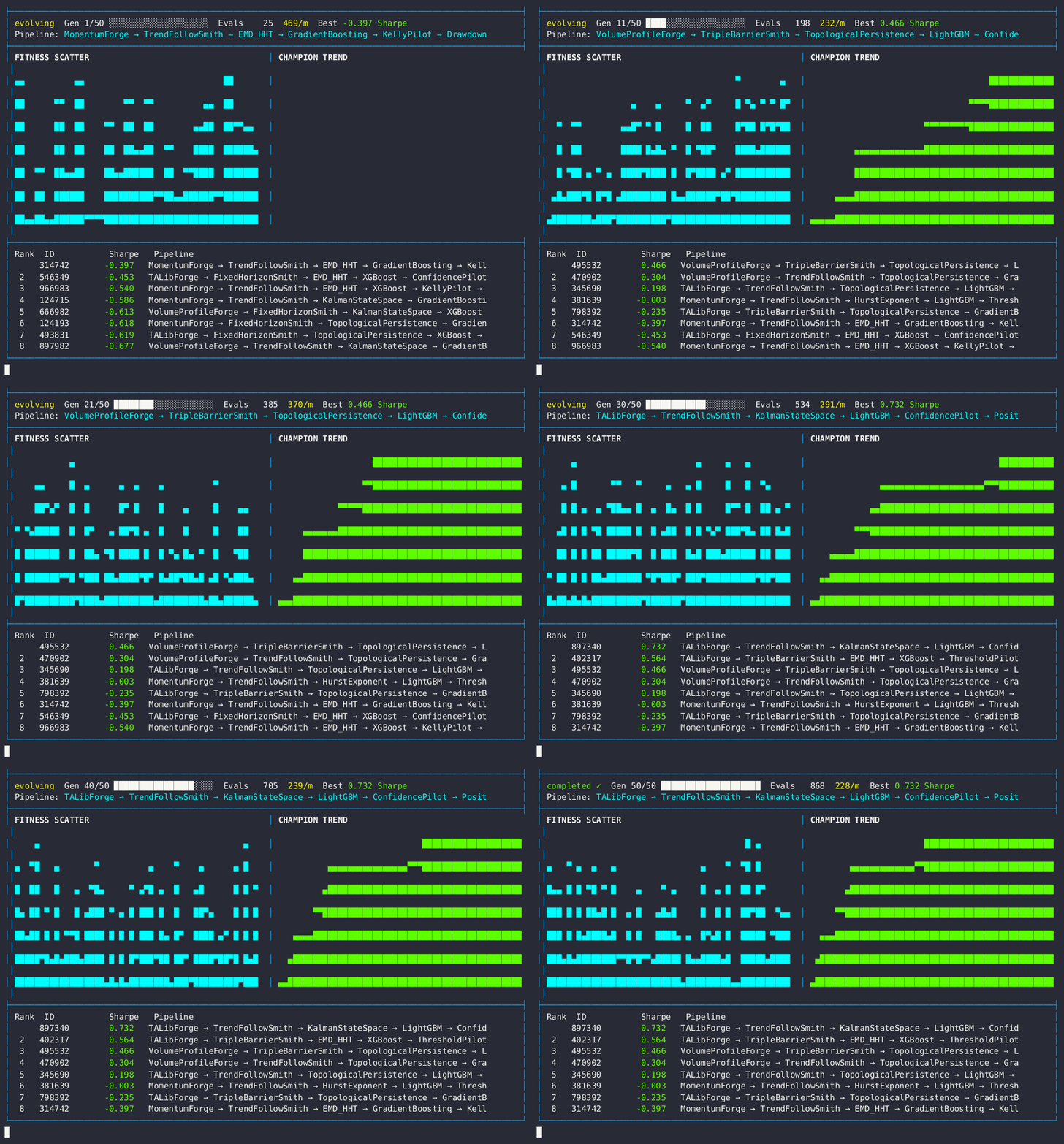
Live dashboard — Sharpe ratio fitness scatter, champion trend, and trading pipeline leaderboard.
19-Stage Pipeline
| # | Slot | Purpose |
|---|---|---|
| 1 | required |
Mandatory base stage |
| 2 | feature_1 |
Primary feature engineering |
| 3 | feature_2 |
Secondary features |
| 4 | feature_3 |
Tertiary features |
| 5 | feature_4 |
Quaternary features |
| 6 | signal |
Signal generation |
| 7 | regime |
Market regime detection |
| 8 | risk |
Risk management |
| 9 | sizing |
Position sizing |
| 10 | execution |
Order execution |
| 11 | portfolio |
Portfolio management |
| 12 | filter |
Trade filtering |
| 13 | timing |
Entry/exit timing |
| 14 | hedge |
Hedging strategy |
| 15 | correlation |
Correlation analysis |
| 16 | volatility |
Volatility modeling |
| 17 | momentum |
Momentum signals |
| 18 | mean_reversion |
Mean reversion signals |
| 19 | ensemble |
Strategy ensemble |
Fitness Configuration
| Parameter | Value |
|---|---|
| Primary Metric | Sharpe Ratio |
| Aggregation | mean − 0.5 × std (penalize variance) |
| Direction | Maximize |
| Exception Penalty | −99.0 |
| Datasets | 367+ financial instruments |
💎 VEOX Pro Activation
To unlock VIP Evaluators and Pro Algorithms (like PaperKit and Generative routines), you must authenticate your local node with a VEOX License Token.
from veox import VeoxEvolver

evolver = VeoxEvolver("trading", api_url="http://127.0.0.1:8090")

# 1. Fetch your unique Hardware Fingerprint
fingerprint = evolver.get_system_fingerprint()
print(f"My VEOX Node Fingerprint: {fingerprint}")
# Example Output: My VEOX Node Fingerprint: 476ad03474b31e3c84d07df9088d93f0

# 2. Provide this fingerprint to your VEOX Admin to receive a JWT Token
jwt_token = "eyJ0b2tlbiI6ICJVRExK...EXPIRES"  # Replace with your token

# 3. Activate the Enclave
if evolver.activate_license(jwt_token):
    print("VIP Features Unlocked!")
    # evolver.fit(...) will now utilize full Pro capabilities
Multiple Datasets
Trading supports both server-side datasets and client-uploaded OHLCV data:
import pandas as pd
import numpy as np
from veox import VeoxEvolver

# Generate synthetic OHLCV data (must have a 'close' column)
def make_ohlcv(name, length=1200, seed=42):
    rng = np.random.default_rng(seed)
    close = 100 + np.cumsum(rng.normal(0, 1, length))
    return pd.DataFrame({
        "open": close + rng.normal(0, 0.5, length),
        "high": close + abs(rng.normal(0, 1, length)),
        "low": close - abs(rng.normal(0, 1, length)),
        "close": close,
        "volume": rng.integers(1000, 10000, length),
    })

df1 = make_ohlcv("ETH", seed=42)
df2 = make_ohlcv("BTC", seed=99)

evolver = VeoxEvolver("trading")
evolver.fit(
    data=[df1, df2],
    target_column="close",      # Trading requires a close/price column
    max_generations=3,
)
print(f"Best Sharpe (averaged): {evolver.best_fitness_:.4f}")
Server-side data
By default, trading uses proprietary financial datasets bundled with the server. You can mix server-side and uploaded data.
Tips
- Patience: Trading evals are 10-100× slower than classification.
- Start with 1 generation:
max_generations=1to verify the pipeline boots. - Server-side data: Trading uses proprietary financial datasets on the server.
- Client data: Upload your own OHLCV DataFrames — must include a
closecolumn. - 6-Phase ramp: The engine automatically ramps complexity over generations.