
 | Quick Start
Everything you need to build, test, secure, and evolve with VEOX.
Table of Contents
Overview
The VEOX system is composed of two parts:
- The VeoxEvolver python client -- a PyPi package you can use in your Python scripts and notebooks
- The server -- the "backend" engine VeoxEvolver connects to, in order to perform algorithmic discovery
This Quickstart guide will help you get both components up and running quickly.
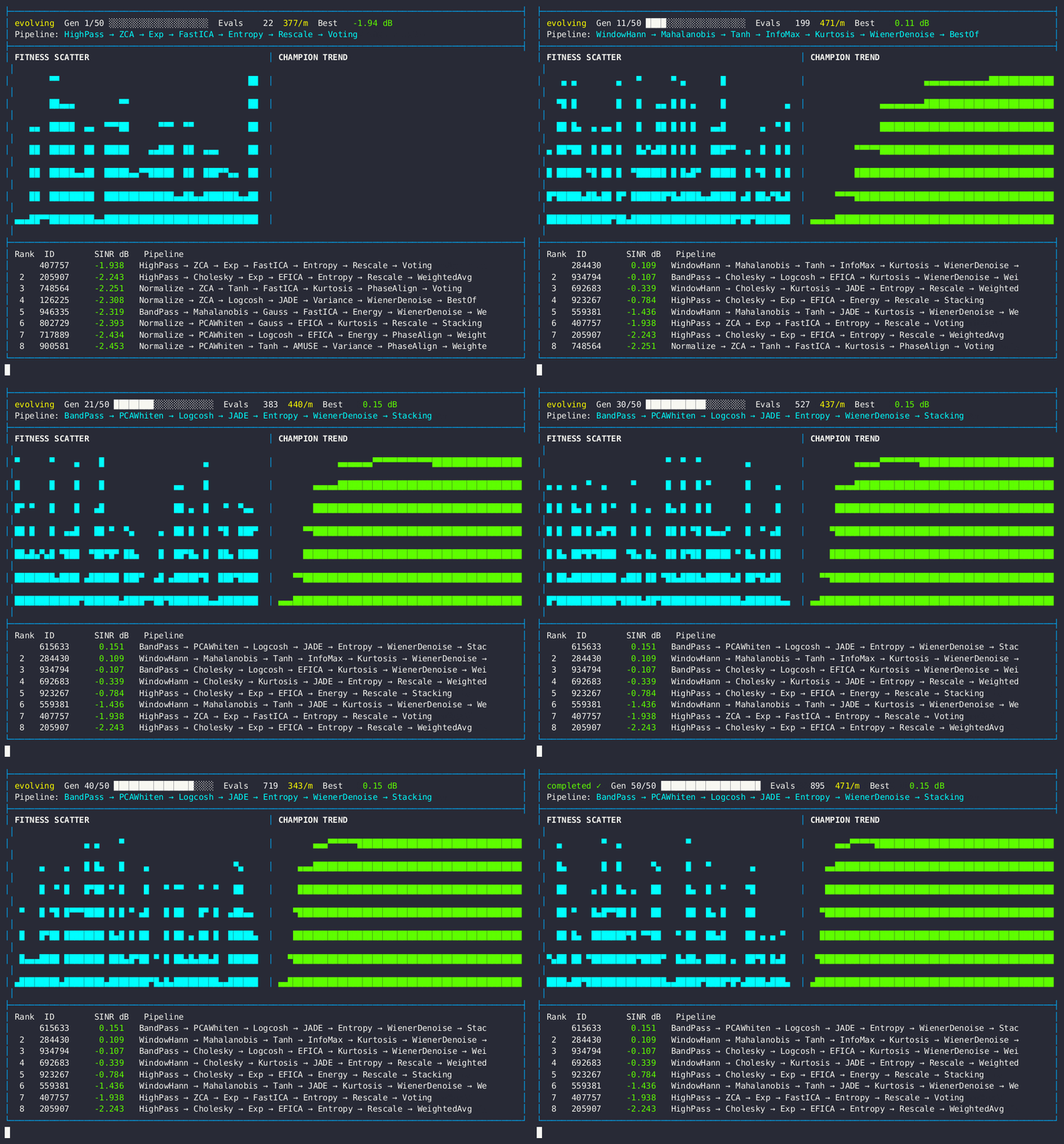
Live evolution dashboard — fitness scatter, champion trend, and pipeline leaderboard.
Data Protection & Privacy
VEOX is designed to protect the privacy of your data and the integrity of your intellectual property (i.e. novel algorithms). This guide will help you set up a VEOX server locally on your own machine, ensuring that your data never leaves your system. All data "uploaded" to the server is merely copied to the server running on your machine. It is never shared with VEOX or any third party.
1. VEOX Server Setup
Pre-requisites: a container runtime such as Docker or Podman must be present on your system. Refer to the Docker documentation for installation instructions.
Step 1: Pull the Docker container
docker pull 714044927654.dkr.ecr.us-east-2.amazonaws.com/doug/single_enclave/veox-enclave-server:latest
Step 2: Run the Docker container
Step 3: Verify It's Running
from veox import VeoxEvolver

ev = VeoxEvolver("binary", api_url="http://127.0.0.1:8090")
ev.health_check()   # ✅ Server is healthy
2. Python SDK Quick Start
The VeoxEvolver client is a Python PyPi package.
Dependencies: requests, rich, pandas, scikit-learn.
Step 1: Install the Python SDK
You can install it directly via pip:
Step 2: Import VeoxEvolver
Step 3: Evolve with Your Own Data
from sklearn.datasets import make_classification
import pandas as pd
from veox import VeoxEvolver

# Generate a dataset (or load your own CSV)
X, y = make_classification(n_samples=500, n_features=20, n_informative=10, random_state=42)
df = pd.DataFrame(X, columns=[f"f{i}" for i in range(20)])
df["target"] = y

# Evolve! Data is uploaded to the server (ephemeral /tmp/ in Docker)
evolver = VeoxEvolver("binary")
evolver.fit(data=df, target_column="target", max_generations=5)
print(f"Best AUC: {evolver.best_fitness_:.4f}")
Key Features
| Feature | Code |
|---|---|
| Upload data | evolver.fit(data=df, target_column="target") |
| Health check | evolver.health_check() |
| List families | VeoxEvolver.list_algorithms() |
| Custom fitness | evolver.fit(custom_fitness_code="...") |
| Callbacks | evolver.fit(on_champion=my_handler) |
| Export JSON | evolver.to_json() |
| Export DataFrame | evolver.to_dataframe() |
| Save / Load | evolver.save("r.json") / VeoxEvolver.load("r.json") |
| Auto server | with VeoxEvolver.serve() as ev: (connects to running enclave) |
| Silent mode | VeoxEvolver("binary", verbose=False) |
Result Attributes
| Attribute | Description |
|---|---|
evolver.best_fitness_ |
Best score |
evolver.best_pipeline_ |
Decoded pipeline: XGBoost → Scaler → Fusion |
evolver.champions_ |
All champions with scores |
evolver.result_ |
Full EvolutionResult container |
evolver.result_.evals_per_minute |
Throughput |
evolver.result_.success |
True if completed with ≥ 1 eval |
3. Per-Algorithm Guides
Detailed guides for each algorithm family with pipeline stages, fitness configuration, baselines, and tips:
| Family | Guide | Metric |
|---|---|---|
| 🎯 Binary Classification | Binary Classification | AUC (Area Under ROC Curve) |
| 📈 Regression | Regression | R² (coefficient of determination) |
| ⚡ Optimization | Optimization | Best function value (lower = better) |
| 🔍 Outlier Detection | Outlier Detection | PR-AUC (Area Under Precision-Recall Curve) |
| ⏳ Time Series | Time Series | MASE |
| 📊 Trading | Trading | Sharpe Ratio |
| 🔊 Signal Separation | Signal Separation | SINR (dB) |
| --- |
Other Guides
| Guide | Description |
|---|---|
| Comparison | Multi-family Comparison |
| Save & Load Data | Save & Load Result Data |
| Server Connection | Automatic & Reliable Server Connection |
| Custom Fitness | Custom Fitness Functions |
| Paper API | Automate paper generation — PDF is built inside the enclave via API; no LaTeX on your machine |
Testing (verified)
All 7 algorithm families (binary, regression, optimization, outlier, trading, time_series, signal_separation) are verified against a running enclave via the E2E API smoke test. Free tier (no activation) is sufficient for Public Examples and the smoke test. PRO tier (license activation) is required for PaperKit/PDF and ProExamples.
| What | Command / doc |
|---|---|
| Start enclave | bash Private/scripts/run_enclave.sh |
| Health check | curl -s http://127.0.0.1:8090/health |
| Full API smoke (Docker) | See E2E Evolution Test for the exact docker run command |